To allow students to submit a new attempt when they have submitted incorrect attempts and exhausted all available attempts:
- Step 1 - Exclude the wrong attempt
- Step 2 - Allow additional attempt
Step 1 - Exclude the wrong attempt
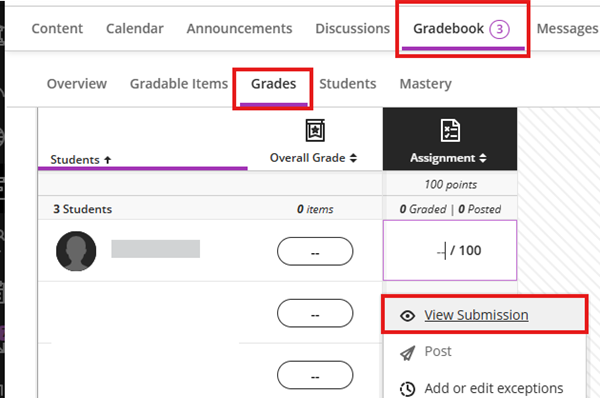
- To access a student’s submission, navigate to Gradebook > Grades, click the cell for the student’s submission, and select View Submission.
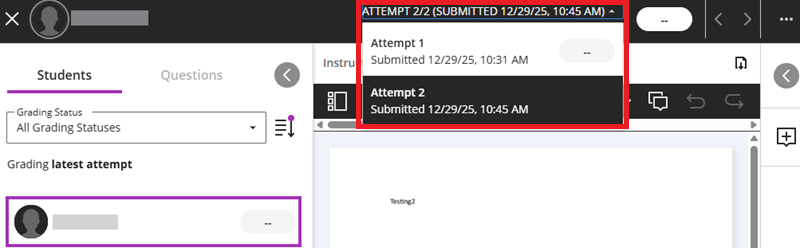
- Select the attempt you want to exclude.
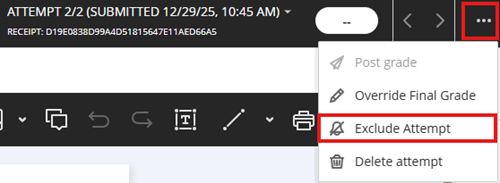
- Click the three dots and choose Exclude Attempt.
- The attempt will be marked as Excluded.

Step 2 - Allow additional attempt
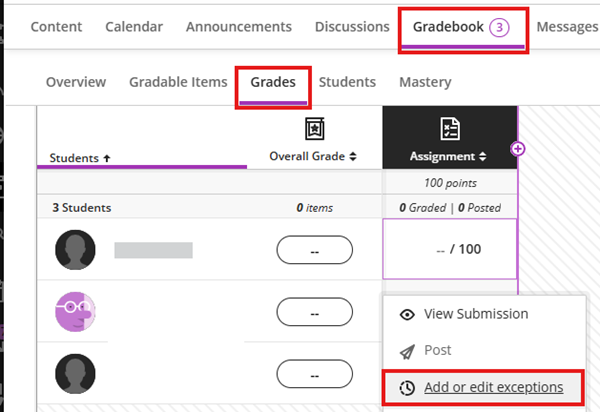
- In the Gradebook, go to Grades and locate the assignment’s grade column. Click the student’s cell. Select Add or Edit Exceptions.
- Update the Attempts Allowed setting. Please note that the exempted attempt is counted as one of the attempts allowed.


Contact us: ITSC Service Desk (https://servicedesk.itsc.cuhk.edu.hk) / elearning@cuhk.edu.hk