Build in the Ultra course experience, this Orientation Course equips participants with the essential skills and knowledge to achieve success as a student in the Blackboard Learn course environment. Students read the lessons and do the hands-on activities on their own within the course. Students are directed to Blackboard Help for more information on each tool presented in the lessons.
Upon completion of this course, participants will be able to:
- Navigate the features available outside of individual courses.
- Set up and customize your personal environment.
- Navigate within a course and switch between courses efficiently.
- Identify and use public, private, and collaborative communication tools in Blackboard.
- Find and interact with users both within and outside of courses.
- Access, submit, and review assignments, tests, and grades.
- Utilize tools that keep students informed of due dates and course events.
- Troubleshoot and resolve common problems in online learning.
Appropriate For: Students new to Blackboard
Delivery Mode: Non-facilitated
Time Investment: 1-2 hours
Self-enrolment Steps:
- Access https://blackboard.cuhk.edu.hk/ultra/courses/_287450_1/outline
- Sign on via the CUHK Login Page.
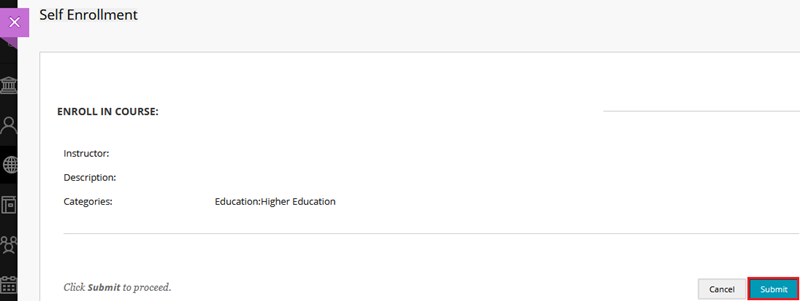
- Click Submit to proceed.
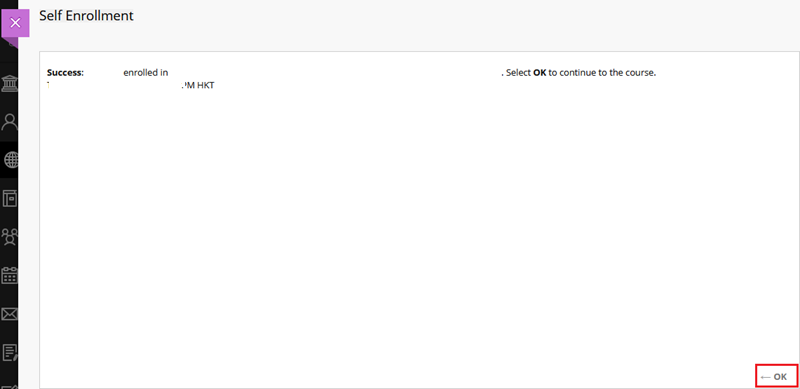
- Click OK.
Notes:
- This course is developed by Blackboard. Some features mentioned may differ from or be unavailable in the CUHK Blackboard environment. If you have any questions, please contact us at ITSC Service Desk (https://servicedesk.itsc.cuhk.edu.hk) / elearning@cuhk.edu.hk.
- This course will be closed around July 2027.
Contact us: ITSC Service Desk (https://servicedesk.itsc.cuhk.edu.hk) / elearning@cuhk.edu.hk.