This course provides a comprehensive introduction to navigating and using the Blackboard Ultra interface. You'll learn best practices for building content, creating assessments, and managing discussions within your course. Through five focused modules—Navigation, Course Development, Performance Tracking, Gradebook Functionality, and Communication—you will gain hands-on experience with the essential tools and features of the platform, enabling you to optimize your course delivery and engagement.
Upon completion of this course, participants will be able to:
- Navigate a Blackboard site using the Ultra experience.
- Explore key course tools and course building features.
- Adapt courses to the Blackboard platform.
- Copy course items from previous courses.
- Create new course items to develop your course.
- Set up gradebook.
- Utilize tools to create a learning community in Blackboard.
Appropriate for: Instructional & Curriculum Designers | Instructors & Facilitator
Delivery Mode: Non-Facilitated | Self-Paced | Asynchronous
Time Investment: 6 hours
Self-enrolment Steps:
- Access https://blackboard.cuhk.edu.hk/ultra/courses/_286974_1/outline
- Sign on via the CUHK Login Page.
- Click Submit to proceed.
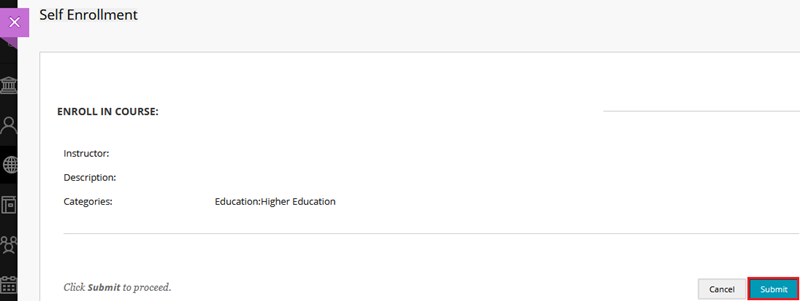
- Click OK.
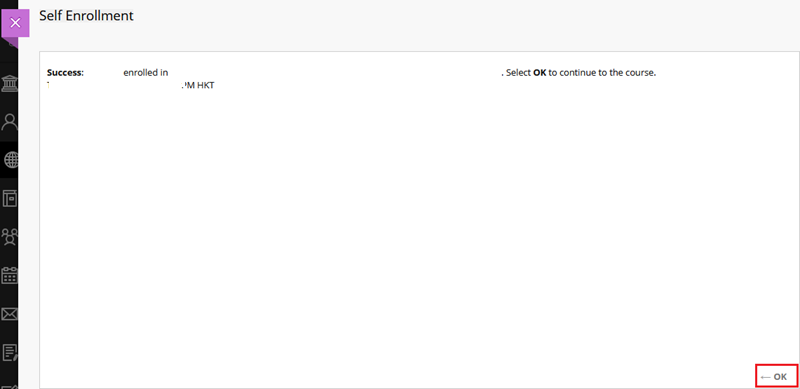
Notes:
- This course is developed by Blackboard. Some features mentioned may differ from or be unavailable in the CUHK Blackboard environment. If you have any questions, please contact us at ITSC Service Desk (https://servicedesk.itsc.cuhk.edu.hk) / elearning@cuhk.edu.hk.
- If you would like to try out the features in a sandbox (blank testing course) or a practice course (testing course with mock data), feel free to submit your request to ITSC Service Desk (https://servicedesk.itsc.cuhk.edu.hk) / elearning@cuhk.edu.hk.
- This course will be closed around July 2027.
Contact us: ITSC Service Desk (https://servicedesk.itsc.cuhk.edu.hk) / elearning@cuhk.edu.hk